
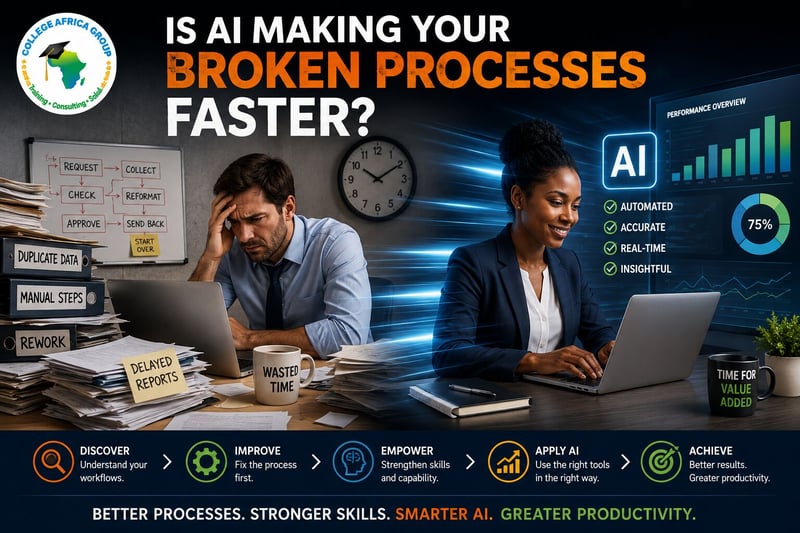
Is AI Making Your Broken Processes Faster?
Sandton, August 23, 2026
Every Monday morning, an Operations Manager receives information from several departments.
One employee copies figures from spreadsheets. Another checks them.
Someone else reformats the information for management.
By the time the report reaches the executive team, hours have been spent moving information around rather than using it to make decisions.
Then somebody suggests AI.
The argument sounds compelling: automate the repetitive work, save time and improve productivity.
But there is a question management should ask first.
“Is AI improving your business process—or simply making a broken process run faster?”
That distinction matters.
Faster Does Not Always Mean Better
Artificial intelligence can perform some workplace tasks remarkably quickly. But speed does not automatically equal productivity.
If employees are duplicating information, AI can potentially duplicate it faster. If the wrong information enters a workflow, AI may help process the wrong information faster.
If five unnecessary steps exist in a process, automating those five steps does not explain why they exist.
This creates an uncomfortable possibility for executives:
You may be automating work that should not be happening in the first place.
Before asking where AI can save time, perhaps management should ask why the process takes so much time.
Look at the Process Before the Technology
This is why AI adoption should start with business objectives and business processes, not software.
Take a monthly management report that requires 30 employee hours to prepare.
The immediate temptation may be to ask whether ChatGPT, Microsoft Copilot or another AI solution could reduce those 30 hours.
But first examine the workflow.
Why does it take 30 hours?
Are employees repeatedly copying information between systems?
Are departments submitting information in different formats? Are spreadsheets poorly structured?
Are managers requesting reports that nobody actually uses?
Those questions can reveal opportunities that have little to do with AI.
Perhaps stronger Advanced Microsoft Excel skills could remove several manual steps.
Perhaps functionality already available within Microsoft 365 could improve collaboration. Perhaps the reporting process itself needs to be redesigned.
The smartest automation decision may be deciding what not to automate.
Discover Where the Time Is Really Going
This is where AI Workflow Discovery becomes valuable.
The objective is not to walk into an organisation looking for places to install AI.
It is to understand how work actually happens.
Where are employees losing time? Where are the bottlenecks? Where is information duplicated? Which repetitive tasks could be improved? Which activities require human judgement?
Only once those questions are answered should an organisation decide whether AI is the appropriate solution.
Sometimes it will be.
ChatGPT can assist with activities such as drafting, summarising, research assistance and process documentation. Microsoft Copilot can support employees within their Microsoft 365 workflows.
But these tools create greater value when they are applied to processes that have already been understood and improved.
Your Employees Still Need Skills
There is another danger in assuming AI will solve productivity problems.
Technology cannot compensate indefinitely for weak workplace capability.
An employee who does not understand the underlying Excel data cannot safely validate an AI-generated analysis.
Someone who does not understand the business process may struggle to recognise when an AI recommendation is inappropriate.
Better workplace skills create better AI outcomes.
AI should extend human capability, not become a substitute for understanding the work.
Human Validation Still Matters
Even in a well-designed process, AI output requires oversight.
A response produced in seconds can still contain incorrect information. An impressive analysis can still be based on poor data. A professional-looking document can still reach the wrong conclusion.
AI produces language. People remain responsible for decisions.
Human validation, governance and accountability therefore remain part of the productivity equation.
Saving ten minutes is not a productivity gain if the result creates an hour of rework—or a costly business decision.
Fix It Before You Make It Faster
Before introducing AI into another workflow, executives should ask:
What business outcome are we trying to improve?
Where is the process currently losing time?
Which steps could be removed or simplified before we automate anything?
Do our employees have the workplace skills required to use and validate the technology?
How will we measure whether the process actually improved?
Those questions shift AI adoption away from experimentation for its own sake and towards measurable business productivity.
College Africa Group approaches AI from that starting point: understand the business objective, review the process, discover where productive time is being lost.
Strengthen workplace skills and then determine where Microsoft 365, ChatGPT, Microsoft Copilot or other AI capabilities can genuinely improve the workflow.
Because making something faster is not necessarily progress.
Sometimes the most important thing AI Workflow Discovery reveals is that the process should have been fixed before anyone tried to automate it.
Better Business Processes. Stronger Workplace Skills. Smarter AI. Greater Business Productivity.
Is AI improving your workflow—or accelerating the problem?
Discover where your employees are losing productive time, which processes should be improved and where AI can create measurable business value.
Explore College Africa Group's AI Workflow Discovery services.
Release information
Issued on behalf of
COLLEGE AFRICA GROUP
Media contact
COLLEGE AFRICA GROUP
A MUSCAT