
Apartment or House? Why DStv Faults in Midrand Need Two Different Fixes
MIDRAND, Gauteng – Midrand, the area between Centurion and Sandton that now forms part of the City of Johannesburg, is home to two very different kinds of DStv setup. Drawing on its page for DStv installers in Midrand, DStv Pro Installation has put together a short guide for residents on why the same "no signal" message can mean two different jobs, depending on where you live.
Two kinds of building, two kinds of fault
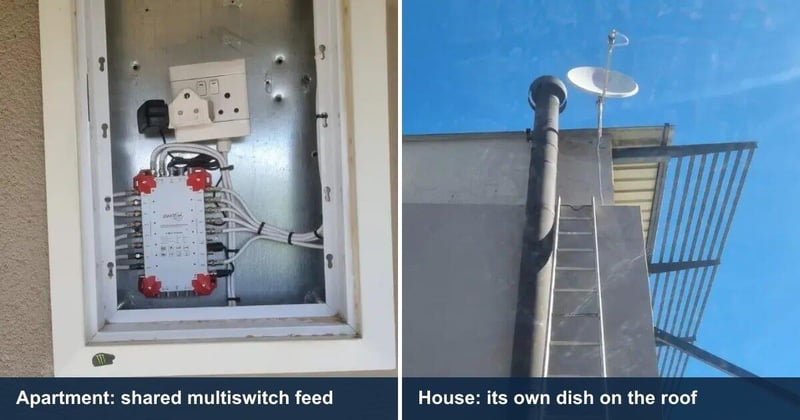
Waterfall City, Carlswald and the newer estates around Blue Hills are mostly dense apartment and cluster developments. Most units there are fed from a communal dish and a multiswitch in a riser cupboard, not from a dish of their own. In the older parts of Midrand, such as Halfway House, Vorna Valley, Noordwyk and Glen Austin, freestanding houses with a private dish on the roof are the norm.
On a communal system the fault is usually a dead port or a bad drop cable, not the dish. On a house it is usually the dish itself, knocked out of alignment after a Highveld thunderstorm. Knowing which setup you have before you phone saves time, because it decides what kind of job the technician is coming out to do.
Apartment or house: a quick comparison
| Where you live | Typical fault | Usual fix | What to check before booking |
|---|---|---|---|
| Apartment or cluster on a communal feed | A dead port on the multiswitch or a bad drop cable, not usually the dish | Repair the port or the drop. A new TV point needs a fresh cable from a spare port in the riser | Whether the building will allow a new cable, and whether the riser has room before you buy a second decoder |
| Freestanding house with its own dish | The dish has moved a couple of degrees, often after a Highveld storm | Realign the dish and rebrace the mount on the same visit | Whether the dish sits on a pole that needs bracing, and where any extra TV point should go |
| Either, after a big storm | A decoder damaged by a surge that came down the aerial cable | Diagnose the decoder before any repair is quoted | Mention the storm when you book. A plug-in surge adaptor does not protect against this |
Storm season and the "couple of degrees" problem
A dish does not have to be blown off its mount to stop working. A movement of a couple of degrees is enough to lose the signal, and wind on a poorly braced pole can move it that far. Realigning the dish fixes the symptom. Rebracing the mount at the same visit stops it drifting again later in the season.
Storms cause a less obvious fault too. A decoder can be damaged by a surge that travels down the aerial cable rather than through the mains, and a plug-in surge adaptor does nothing to stop that.
New decoder, weak signal
In newer apartment blocks the wall point is normally already in place from the developer. It is still worth having it tested rather than assumed. Builder-fitted coax in a rushed finish is one of the most common reasons a brand-new decoder shows a weak signal on the day it is installed.
Want a second TV point in an apartment?
In a freestanding house, an extra TV point is usually a straightforward cable run through the roof space to a new wall plate. In an apartment on a communal multiswitch it is not. Splitting the existing feed loses signal and tends to break the point you already have. The proper fix is a new cable from a spare port in the riser, which needs the building's permission first.
Before you book: a short checklist
- Work out whether your TV is fed from your own dish or from a communal multiswitch.
- In an apartment, ask your body corporate or managing agent about access to the riser before booking a new point.
- If the fault started after a storm, mention it. It points to dish alignment or a surge-damaged decoder.
- Planning Extra View in an apartment? Check the riser has room for a second cable before buying the second decoder.
- If you want the TV wall-mounted, say so when you book so the DStv point can be moved on the same visit.
Getting help
Residents can find more detail on the different setups, and on booking a visit, on the DStv Pro Installation website. Most installations take between one and three hours, depending on where the dish goes, how far the cable runs and how many decoders are being set up, and the price is confirmed before any work starts.
Release information
Issued on behalf of
DStv Pro Installation
Media contact
DStv Pro Installation
Scott